



Meet DAVE, your AI daily briefing

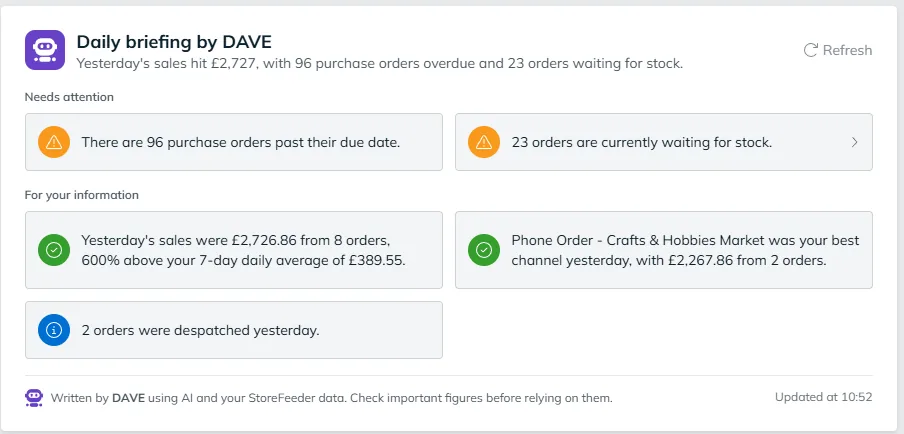
DAVE uses AI to read your StoreFeeder data and write a short briefing: the problems that need attention today, and how yesterday went. It's included in every plan and needs no setup.
Flags orders that lost money in the last 7 days
Spots overdue purchase orders and orders waiting for stock
Compares yesterday's sales with your 7-day average
Click through from most insights to the detail
Included in every plan, no AI account needed
DAVE daily briefing in StoreFeeder showing overdue purchase orders, orders waiting for stock and yesterday's sales
What StoreFeeder customers have achieved:
Truly Sweet Candy reached
99.99%
picking accuracy
Transporter HQ saves
£40K
per year
H2E Commerce raised productivity by
80%
with StoreFeeder
Black Cat Medicines grew to
6K
orders a day
Twinings logo
Kukoon Rugs logo
Applied Nutrition logo
H2E Commerce logo
Transporter HQ logo
Aquacadabra logo
Ransom Spares logo
Twinings logo
Kukoon Rugs logo
Applied Nutrition logo
H2E Commerce logo
Transporter HQ logo
Twinings logo
Kukoon Rugs logo
Applied Nutrition logo
H2E Commerce logo
Transporter HQ logo
Aquacadabra logo
Ransom Spares logo
Twinings logo
Kukoon Rugs logo
Applied Nutrition logo
H2E Commerce logo
Transporter HQ logo
Luke, Kenable
Quote
When we're negotiating with couriers, we can go in with real data and trends rather than just saying we do about 50,000 orders a month.
Luke, Kenable

Why the important numbers get missed

Too many reports to check
The answer is in the system somewhere, but nobody has time to open every report every morning.
Losses hide in the detail
An order that cost more than it sold for looks like any other order until someone goes looking.
Late POs surface too late
An overdue purchase order only gets noticed when customers' orders start waiting for stock.
From your data to a decision

How DAVE turns your data into a briefing

DAVE does the checking you'd otherwise do by hand each morning, and puts the answer in a few lines.

  1. Read DAVE reads your orders, stock, purchase orders and sales in StoreFeeder.
  2. Flag Anything that needs action goes to the top under Needs attention.
  3. Summarise How yesterday went is written up in plain English under For your information.
  4. Act Open an insight to see the orders behind it, or refresh for the latest picture.
What DAVE tells you each day
Needs attention

The problems worth fixing today, at the top

DAVE flags what needs action first: orders that cost more in product than they sold for, purchase orders past their due date and orders waiting for stock.

✓ Loss-making orders from the last 7 days ✓ Overdue purchase orders ✓ Orders waiting for stock
DAVE daily briefing Needs attention section
For your information

How yesterday went, in plain English

DAVE tells you yesterday's sales and order count against your 7-day daily average, and which channel did best, so you know how the business is tracking before you open a report.

✓ Yesterday's sales and orders ✓ Comparison with your 7-day average ✓ Best-performing channel
DAVE daily briefing For your information section
Act on it

From headline to the orders behind it

Most insights open straight to the detail, so you can go from '20 orders are waiting for stock' to the orders themselves in one click. Refresh the briefing whenever you want the latest picture.

✓ Click through from an insight to the detail ✓ Refresh at any time ✓ Shows when it was last updated
No setup

Written from your own StoreFeeder data

DAVE uses AI to write the briefing from the data already in your StoreFeeder account. It runs on StoreFeeder's AI service, so there's nothing to connect and no AI subscription to pay for.
✓ Included in every StoreFeeder plan ✓ No AI account or setup needed ✓ Built on your live StoreFeeder data

How DAVE fits into your day

  1. Open StoreFeeder. The briefing is waiting, with the time it was last updated.
  2. Deal with what needs attention. Loss-making orders, late purchase orders and orders waiting for stock come first.
  3. Check how yesterday went. Sales and orders against your 7-day average, and your best channel.
  4. Dig in where you need to. Most insights open straight to the detail behind them.

Who DAVE helps

  • Owners and directors: see how the business is doing without opening a report.
  • Operations managers: spot orders stuck waiting for stock before customers chase them.
  • Buyers: catch overdue purchase orders before they hold up sales.
  • Finance: see orders that cost more in product than they sold for.

DAVE, Insights and Insights Pro

DAVE is the quickest way to see what matters today. When you want to go further, Insights gives you reports, scheduled reports and dashboards in every plan, and Insights Pro adds custom dashboards, an AI dashboard builder and an MCP connection so you can ask ChatGPT or Claude about your data directly.

A note on AI

DAVE writes the briefing with AI from your StoreFeeder data, and each briefing says so. Check important figures in StoreFeeder before relying on them for a decision.

Frequently asked questions

Is the DAVE daily briefing included in every plan?

Yes. The DAVE daily briefing is included in every StoreFeeder plan at no extra cost.

What does the daily briefing tell me?

It splits into two parts. Needs attention covers things to act on, such as orders that cost more in product than they sold for, overdue purchase orders and orders waiting for stock. For your information covers how yesterday went, such as total sales and orders against your 7-day average and your best channel.

Do I need my own AI account to use DAVE?

No. DAVE runs on StoreFeeder's own AI service, so there's nothing to connect or pay for separately. That's different from the MCP connection in Insights Pro, where you connect your own ChatGPT or Claude account.

Where do I see the daily briefing?

Inside StoreFeeder. The briefing shows when it was last updated, and you can refresh it whenever you want the latest picture.

Can I rely on the figures in the briefing?

DAVE writes the briefing with AI from your StoreFeeder data, and most insights open straight to the detail behind them. As with any AI-written summary, check important figures in StoreFeeder before you rely on them for a decision.

Does DAVE change anything in my account?

No. The daily briefing reads your StoreFeeder data and summarises it. It doesn't change orders, stock or purchase orders; you decide what to do about each insight.

What's the difference between DAVE and the MCP connection?

DAVE gives you a ready-made daily briefing in every plan, using StoreFeeder's own AI service. The MCP connection, part of Insights Pro, lets you connect your own ChatGPT or Claude account and ask it anything about your StoreFeeder data, or have it make updates for you.

StoreFeeder demo specialist

See DAVE's briefing on your own data

Leave your details and we'll call you to arrange a free 30-minute demo, covering:
Check Light
Your workflow recreated in StoreFeeder
Check Light
Transparent pricing for your business size
Check Light
Implementation timeline and process
No obligation. Rolling monthly or discounted annual contract. We'll call you the same working day, usually within an hour.

Please enter your name

Please enter a valid email address

Please enter your company name

Please confirm that you are not a robot

Prefer to pick a time? Book a slot now

Thank you! Your submission has been received!
Oops! Something went wrong while submitting the form.