



































Welcome to the latest Release Updates post.
Amazon Easy Ship

Before we dive into last months updates - we've been working on bringing you a new feature to our Amazon integration and that is support for Amazon's Easy Ship program. We're delighted to be able to announce that the feature is now available in it's beta stage for early adopters of the Easy Ship program to be able to test and give us feedback on areas we could improve on (unless it's already perfect of course, we'd love to hear that feedback as well!)
If you'd be interested in being a part of the early access to our Amazon Easy Ship feature, then please reach out to our support team and let them know. Also, I know it may sound a little obvious but, please make sure you have access to Amazon Easy Ship before reaching out to our team about early access. We cannot give you access to Easy Ship, this is something Amazon has to do.
As per usual, our developers have been working hard to bring you an exciting update this month. There has been a lot of work in the background (which you can read about here) but there have been some great updates and new features released this past month, the highlights of which are below:
Import / Export Supplier Data

Most of you will have already used our excellent product import/export tool to make changes in bulk to your products, perhaps you've even used it as a means to extract data to create custom reports as well, there's lots of uses for such a simple yet powerful tool.
Whilst it's possible to edit product supplier data through the product import/export tool, we recognise that it wasn't the most efficient when it came to wanting to edit just a single suppliers data on a product and it may have even been missing a couple of the newer fields related to suppliers such as "Carton Barcode" for example. To fix this we have added to new pages to the import/export page specifically for manipulating/extracting data related to suppliers, the aptly named:
- Export (Product Supplier)
- Import (Product Supplier)
Through these pages you can export and import product data by supplier as you can see below:
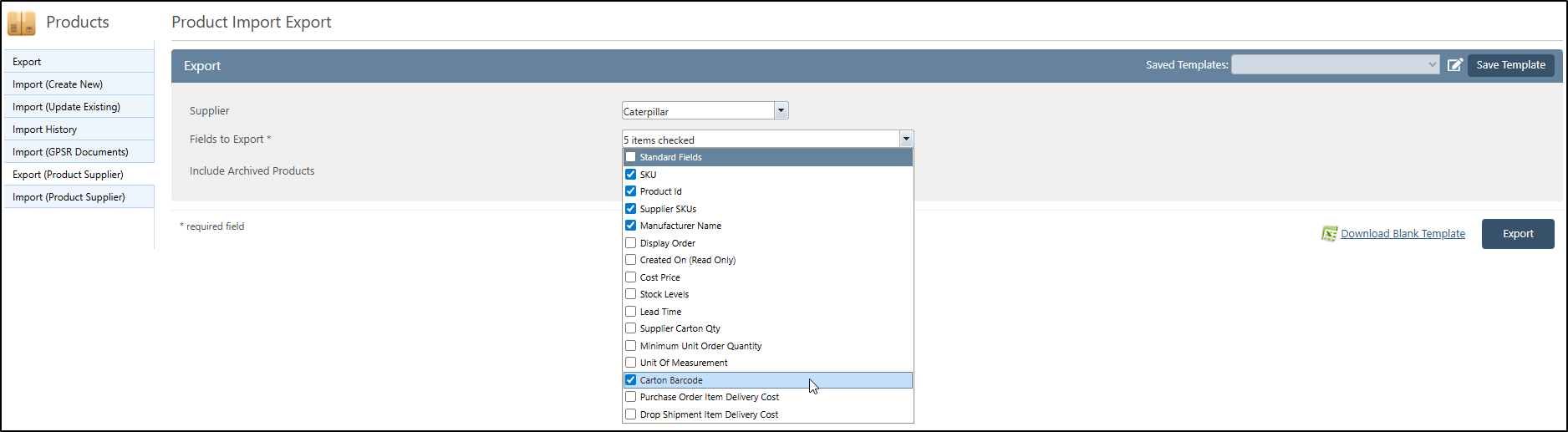
We hope this helps simplify the process of making adjustments to supplier data.
User Permission - Reassign Pickers
Really straightforward one but very useful nonetheless - Previously, it wasn't possible for non-admin users to be given permission to reassign pickwaves; we found that this led to pickers having to pester whoever their closest admin when a picker needed to be reassigned, sometimes this admin wouldn't even be in the picking area of the warehouse which would just cause delays to picking efficiency.
Rather than have to give a lot of permissions to a member of staff that you'd rather not have access to everything, we've instead just added the option to give permission to regular access users to be able to reassign pickwaves to users.
If you want to learn more about user permissions, check out our knowledgebase article here.
FedEx Saturday Services

If you are able to utilise FedEx's Saturday shipping services, you can now also do the same through our FedEx integration in StoreFeeder. To do so, simply set the new toggle that can be found on your FedEx shipping methods titled "Saturday Service" to "On" as you can see below:
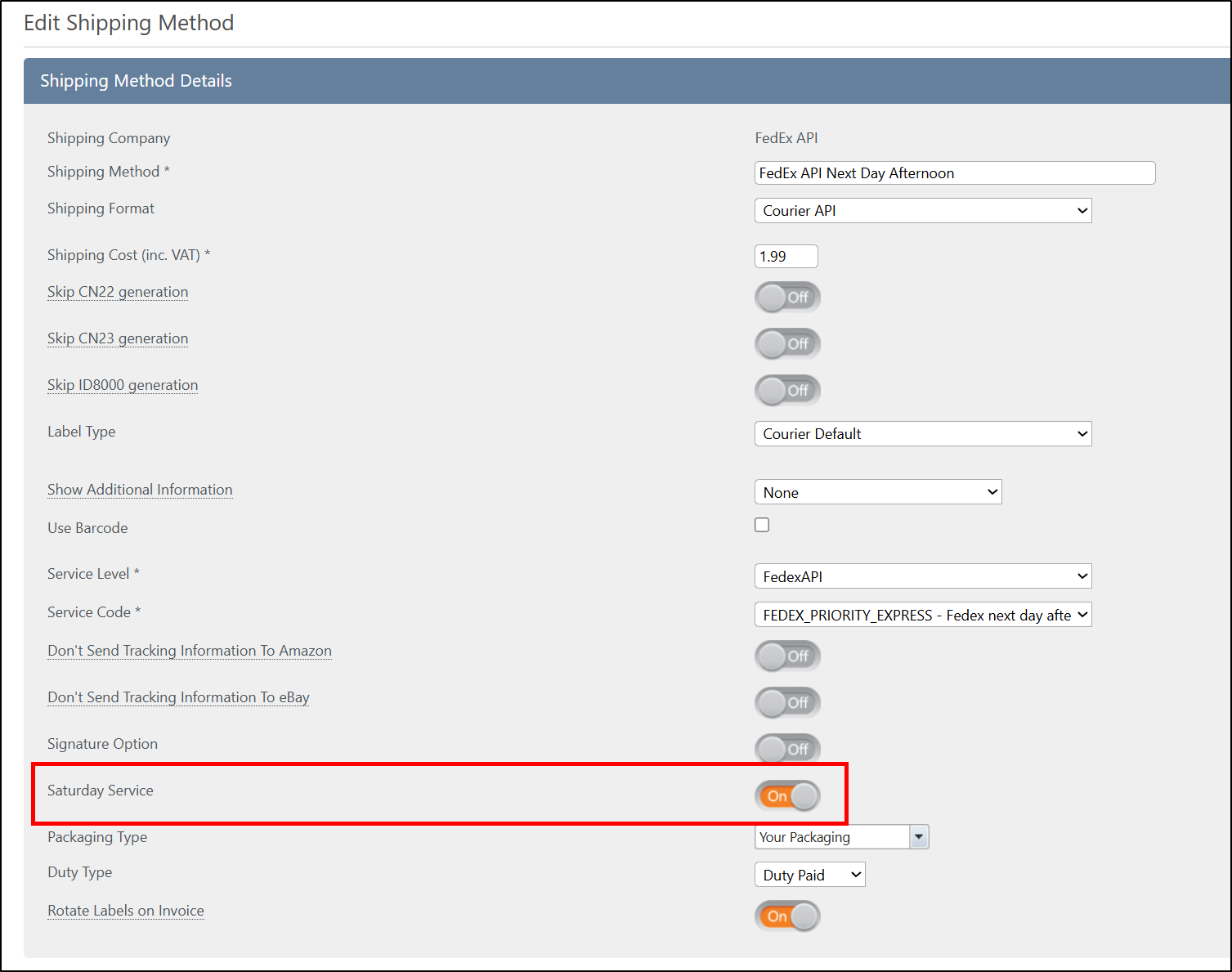
Now of course, this will only work on labels generated with this service on a Friday or perhaps a Thursday on one-off cases like Easter Friday or similar holidays. It'll also only work for select service codes that you have an agreement with FedEx in place to be able to use Saturday service with so, it goes without saying but, make sure you're aware of which codes they are before creating shipping methods for them!
If you need a refresher on creating shipping methods or rules for them, you can find links to useful guides on the subject below:
Finally….
There have been some great new features and fixes implemented in this last month's releases and we hope you find them useful in one way or another.
As always we’ll keep working hard to provide you with the best service we can.
From all of us here at StoreFeeder, happy selling.
The StoreFeeder Team


