



































Welcome to the latest Release Updates post.
September in Britain has that lovely hazy handover feel; Summer's last deckchair giving way to autumn's first cardigan, with those long, mild days still lingering before the nights properly draw in. Up north, Blackpool flicks the switch on its famous Illuminations; which, for me in particular, will always remind me of my mother shouting "It's like the Blackpool Illuminations in here!" if I'd left the lights on in my room as a child. Surely I can't be alone in that?
Down in London, thousands of online retailers and exhibitors will be descending on the ExCeL Arena for the eCommerce Expo (23–24 September) and we'll be there too, exhibiting alongside them as the industry starts quietly plotting its plans for the all-important Q4 ahead. It's against that backdrop that this past month's update arrives...
As per usual, our developers have been working hard to bring you an exciting update this month. There has been a lot of work in the background (which you can read about here) but there have been some great updates and new features released this past month, the highlights of which are below:
Purchase Order Mode Visibility

When setting up suppliers and purchase order processing in StoreFeeder you also have the option to set up requisitions. Our requisitions feature is extremely useful in your stock management as it recommends purchase orders for you to raise based off of the purchase order mode that you have set against the supplier such as: Sold in last X days, Below reorder level, On demand etc.
Whilst it's incredibly useful to have this tool calculate purchase orders for you, it can also be easy to forget why the requisition has been raised in the first place. To help visibility on the matter we've added a "Purchase Order Mode" filter to both the requisitions and purchase order pages.
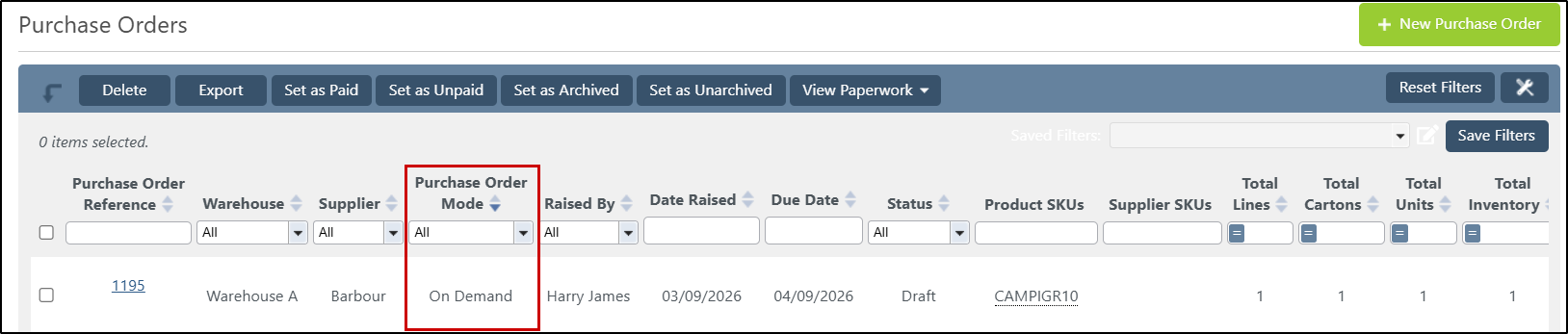
With the requisitons page filter, StoreFeeder will display the purchase order mode that's been used to calculate the requisition; on the purchase order page it will display the purchase order mode that raised the requisition that the purchase order was created from - an important distinction, since the purchase order mode could have changed since the the purchase order was created.
Order Line Volume Export Token
We've added a new token for your order export templates, "OrderLineVolume".
For each order line, "OrderLineVolume" calculates the total cubic volume of that line by taking the ordered product's own dimensions (Length × Width × Height) and multiplying by the line quantity. This makes it easy to include per-line volume figures directly in your order exports, handy for things like freight costing or carrier volumetric weight calculations.
Now you might be wondering, how is this different from the "CubicMetreVolume" token that's already in StoreFeeder? Well, if you're already using the existing "CubicMetreVolume" token, then you'll know that "CubicMetreVolume" tells you the volume of the parcels an order ships in; "OrderLineVolume" tells you the volume of the actual products on each individual line, independent of how they're packed.
You can add "OrderLineVolume" to any CSV export template, simply head to your export template settings to add it alongside your other order line tokens.
New Insights Report: Product Sales by Channel
We've added a new report to our insights engine to help you dig deeper into your sales data and quickly identify your best-selling products.
What it does
This report breaks down sales by product, giving you a clear view of how each item is performing; including how much of it has sold, which sales channel it sold through, and how much revenue it's generated.
Columns included
- SKU – the product's SKU
- Kit – whether the product is a kit
- Name – the product name
- Inventory – current inventory level
- Quantity – total units sold in the selected period
- Channel – the sales channel the orders came through
- Total Revenue – quantity sold × the product's regular price
- Total Revenue (Sold Price) – the actual total revenue based on the price the product sold for
- Product GUID – unique product identifier
Results are sorted by quantity sold (highest to lowest), so your best-sellers will always appear right at the top.
How it's scoped
The report respects your users existing access permissions, anybody using the report will only see data for warehouses and channels they are allowed to. It also automatically excludes cancelled/refunded orders, deleted orders or products, inactive channels, and unmapped products, so the figures reflect genuine, sellable stock and orders.
Why it's useful
Whether you're planning stock levels, reviewing channel performance, or just want to know what's flying off the shelves, this report gives you the product-level detail to make faster, more informed decisions.
You'll find Product Sales by Channel available now in your Insights reports.
Finally….
There have been some great new features and fixes implemented in this last month's releases and we hope you find them useful in one way or another.
As always, we’ll keep working hard to provide you with the best service we can.
From all of us here at StoreFeeder, happy selling.
The StoreFeeder Team


