




































.png)
Your StoreFeeder Security Score matters. Here’s how to improve it.
June 12, 2026
Security is one of those things every business knows is important, but it often only gets urgent after something has gone wrong.
At StoreFeeder, we want to help our users stay ahead of that risk.
That is why we have introduced the StoreFeeder Security Score: a simple way to understand how well your account is protected, where the risks are, and what practical steps you can take to improve.
.png)
During our recent StoreFeeder Sessions event, we spoke about the importance of account security and shared some findings from our research. What we found was eye-opening.
- 19% of StoreFeeder user passwords already appear in known breach data.
- 25% of users reuse the same password across multiple accounts.
That means a significant number of users are exposed before an attacker has even targeted StoreFeeder directly. If a password has been leaked elsewhere, or if the same password is used across multiple platforms, it can become much easier for someone to attempt unauthorised access.
For ecommerce businesses, that matters.
StoreFeeder connects to and stores data from all your sales platforms, including marketplaces, couriers, stock systems, orders, customers and operational workflows. You would never dream of running your Amazon or eBay account without strong security controls in place, so the same level of care should apply to StoreFeeder.
Yet our research also found that:
- Only 9% of accounts have MFA activated for all users.
- Only 10% of accounts have MFA activated for at least 80% of their users.
That leaves a large number of businesses relying on passwords alone.
Why your Security Score is important
Your Security Score is designed to give you a clearer view of how secure your StoreFeeder account is.
You can find your businesses Security Score on the Home page inside StoreFeeder, accessible through the “house” icon in the top left on the navigation bar.
It highlights areas where your business is already protected, as well as areas where improvements should be made. The goal is not to create extra admin for the sake of it. The goal is to help you reduce risk, protect your data and make it harder for unauthorised users to access your account.
A stronger Security Score means your account is making better use of the protection tools already available within StoreFeeder.
These tools are there to help you protect your business, your customers, your orders and your operational data.
Start with Multi-Factor Authentication
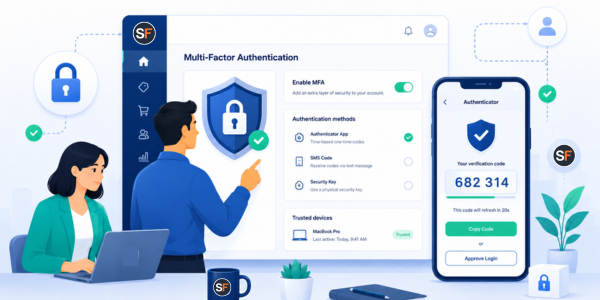
Multi-Factor Authentication, commonly known as MFA, is one of the most effective ways to protect user accounts.
Instead of relying on a password alone, MFA requires users to verify their identity with an additional code from an authenticator app, such as Google Authenticator, Authy or Microsoft Authenticator.
This means that even if a password has been reused, guessed or exposed in a data breach, an attacker still cannot access the account without the second factor.
In StoreFeeder, MFA can be enabled from:
Settings > Company > Multi Factor Authentication
You can allow users to set it up voluntarily, or you can make it mandatory from a chosen date. If made mandatory, all users will be required to set up MFA when logging in, unless an admin has specifically marked them as exempt.
https://support.storefeeder.com/hc/en-gb/articles/4408064544273-Multi-Factor-Authentication
If MFA is not currently active across your account, this should be your first priority as very soon, MFA will become mandatory for all StoreFeeder users.
Review password habits
Passwords remain a major weak point for many businesses.
The issue is not always that users choose weak passwords. The bigger risk is that passwords are often reused across different services. If the same password is used for an email account, marketplace account, personal account and StoreFeeder login, one breach elsewhere can quickly become a risk to your business systems.
Encourage your team to use unique passwords for StoreFeeder and to store them in a trusted password manager.
Users should never share logins. Each person should have their own account, with the correct permissions for their role. This gives you better control, better visibility and a much safer setup.
Restrict access by IP address
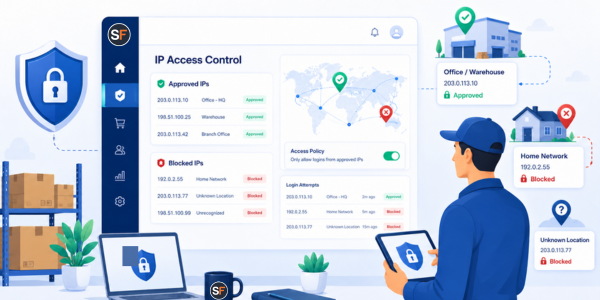
Another powerful security feature within StoreFeeder is IP address restriction.
This allows you to control where users can access StoreFeeder from. For example, you may want users to log in only from your office, warehouse or approved business locations.
Think about a picker in your warehouse. They may need access to StoreFeeder during their shift, from your business premises, using approved equipment. But would you want that same login being used from home, from an unknown location or from a personal device?
For many users, the answer is no.
IP restrictions help you limit access to approved locations. This gives you another layer of protection, especially for operational users who only need StoreFeeder access from a specific site.
To use IP restrictions, StoreFeeder Support will first need to activate the feature on your account. Once active, admin users can manage it from:
Settings > Security > IP Addresses and Locations
From there, you can add approved IP addresses, switch IP checks on, review access requests and decide whether individual users should be exempt where appropriate.
https://support.storefeeder.com/hc/en-gb/articles/4408072177425-Restricting-Access-by-IP-Address
Check user permissions
Improving your Security Score is not only about MFA and passwords. It is also about making sure users only have the access they need.
Review your users regularly.
Ask yourself:
- Does this person still need access?
- Do they have the correct role?
- Do they have more permissions than they need?
- Are former employees or old users still active?
- Are shared logins being used?
Good security is about reducing unnecessary access. The fewer unused accounts and excessive permissions you have, the lower your risk.
Make security part of everyday account management
Security should not be a one-off task.
As your team changes, your processes change and your business grows, your StoreFeeder setup should be reviewed regularly. New users should be added with the correct permissions. Leavers should be removed promptly. MFA should be enabled. IP restrictions should be reviewed when teams move location or working patterns change.
Your Security Score gives you a practical way to keep track of this.
It helps turn security from something vague into something visible and actionable.
What you can do today
To improve your StoreFeeder Security Score and better protect your account, we recommend taking the following steps:
- Enable MFA across your StoreFeeder account.
- Make MFA mandatory for all users where possible.
- Review users who have not yet set up MFA.
- Make sure every user has a unique login.
- Remove users who no longer need access.
- Review permissions and reduce unnecessary access.
- Use strong, unique passwords.
- Enforce regular password changes for all users.
- Consider using IP address restrictions for warehouse, office and operational users.
- Review your security settings regularly.
All of these tools are already available within StoreFeeder to help protect your business data.
Please use them.
Your StoreFeeder account holds important information from across your ecommerce operation. Orders, customers, stock, courier data and sales platform connections all flow through the system. Keeping that secure is not optional. It is a key part of protecting your business.
Your Security Score is there to help.
Log in to StoreFeeder, review your score and take action today.


