

















Welcome to the latest Release Updates post.
I was down in London this week and I'll tell you something I found to be both brilliant and crazy at the same time - Oxford Street has gone car-free! Vehicles, bicycles and scooters are now banned from almost a kilometre of the street. Apparently an impact assessment suggests the change will add £82m to the local economy and support 700 new jobs! What an excellent change to that system, speaking of which...
This month’s release is all about saving you time & eliminating errors. From order page improvements to an upgraded Quickbooks integration, here’s a quick look at what’s landed and how it can help you.
As per usual, our developers have been working hard to bring you an exciting update this month. There has been a lot of work in the background (which you can read about here) but there have been some great updates and new features released this past month, the highlights of which are below:
Order Page Improvements

We’ve made it quicker to manage orders directly from the edit order page, bringing more of the actions you use every day into the order itself and tidying up how documents are accessed.
In the new version of StoreFeeder:
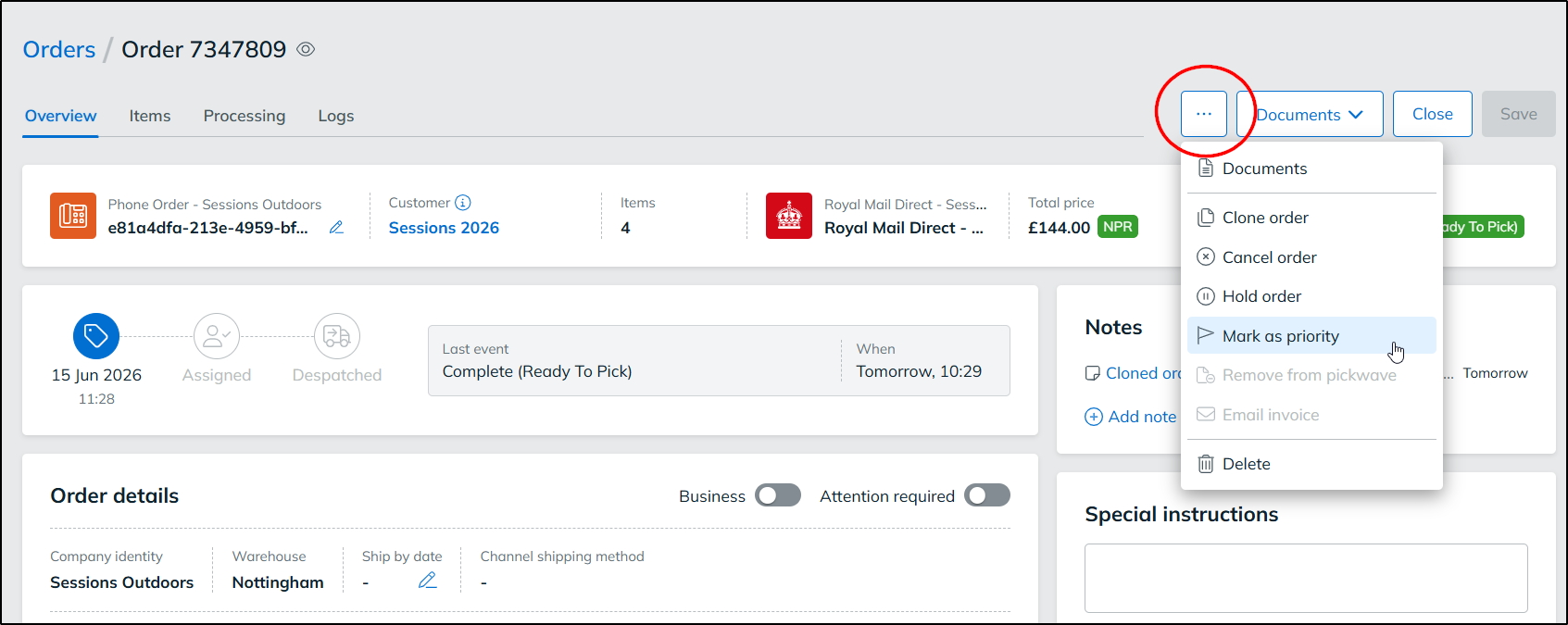
Mark orders as priority from within the order
Until now, marking an order as priority was only possible as a bulk action from the order grid. You can now do this directly from the edit order page using the actions dropdown. The action updates based on the order’s current status: if the order isn’t a priority, you’ll see Mark as priority, and if it already is, you’ll see Remove priority.
Hold and unhold combined into one action
For consistency, Hold order and Unhold order now work the same way. Rather than appearing as two separate options, a single action switches between the two depending on whether the order is currently on hold.
New Print button for order documents
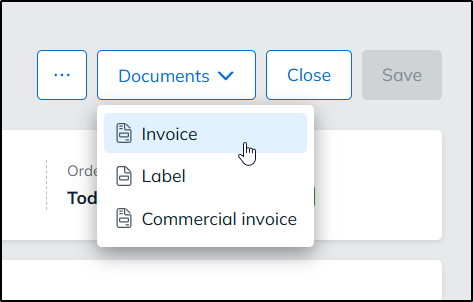
Printing order documents is now simpler. The individual document options (from Invoice through to Return label) have moved out of the More Options menu and into a dedicated Print button. The Print button only lists the documents that are available for that order, so you won’t see options that don’t apply. If no documents are available, the button is disabled.
In their place, the More Options menu now has a single Documents item. Selecting it opens the documents dialog at the first available document for the order. This option is enabled whenever at least one document is available.
In the current version of StoreFeeder:
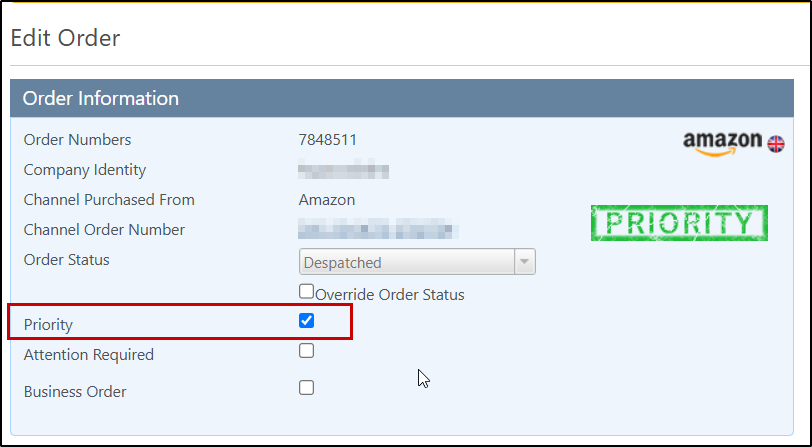
If you’re still using the current version of StoreFeeder, you can now set an order’s priority from within the order too. A new Priority checkbox has been added to the Order Information panel on the edit order page, next to Attention Required. Previously, just in the same way as the new version of StoreFeeder, the priority flag could only be set using the bulk action on the order grid.
Shipping rules for bladed items
If you sell knives or other bladed items, those orders need to be sent with a courier service that verifies the recipient’s age on delivery. Until now, StoreFeeder had no way to identify a product as bladed, which meant making sure these orders went to the right service was a manual check that was easy to miss. You can now flag products as bladed and use shipping rules to route those orders automatically. Here's how to go about setting it up:
Mark products as bladed
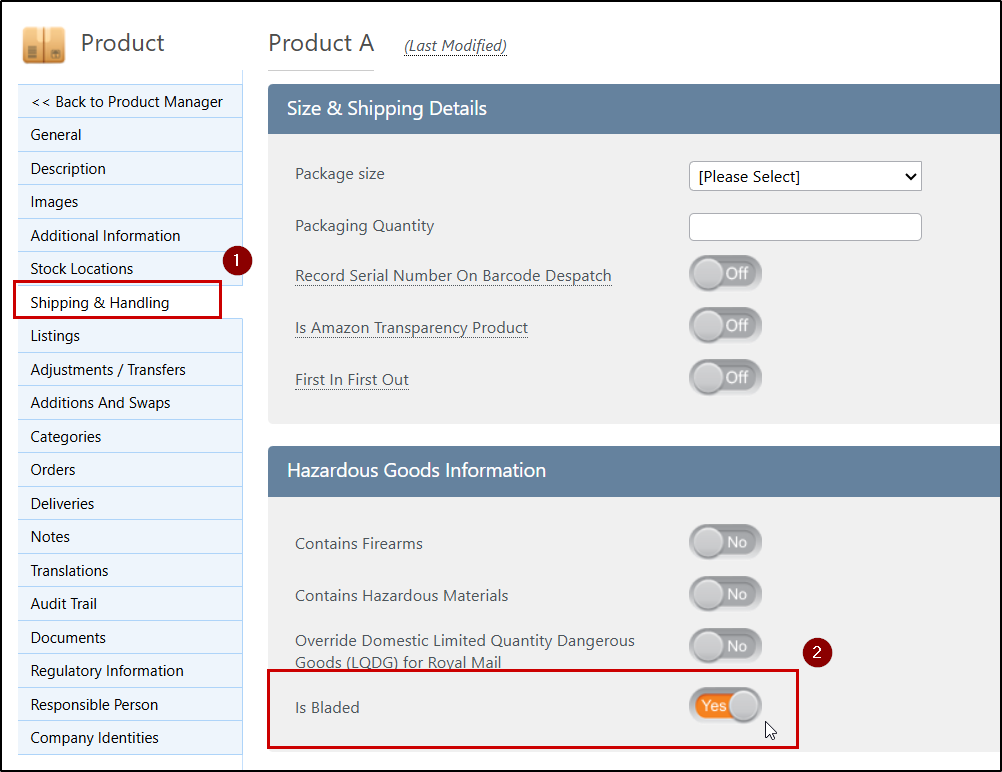
Products now have an Is Bladed toggle. Edit a product and head to the Shipping & Handling tab to switch this on for any product that’s a knife or other bladed item so StoreFeeder knows to treat it accordingly.
If you have a large catalogue, you don’t need to edit each product individually. The Is Bladed field has been added to the Product Import/Export tool, so you can export your products, set the field for the relevant items, and import the file to update them all at once.
Route bladed orders with shipping rules
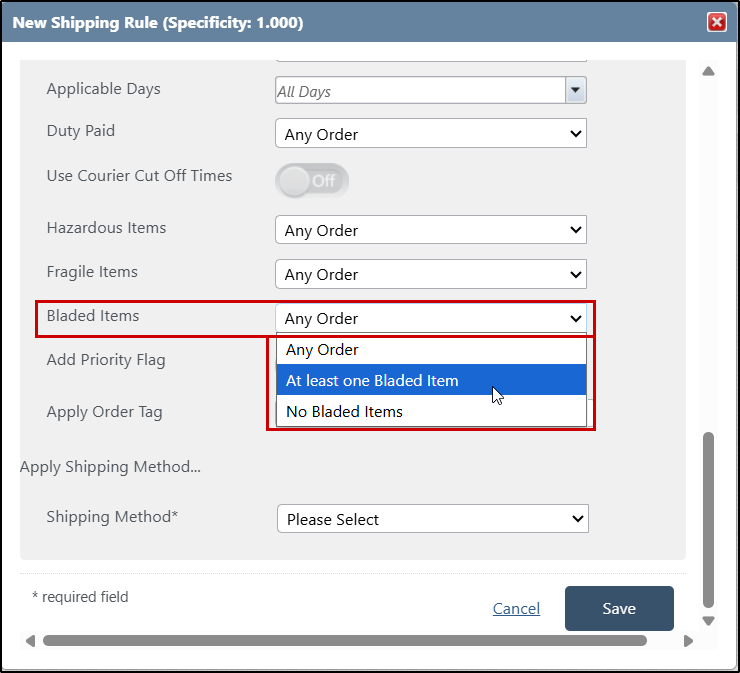
Shipping rules now include a new bladed items criteria with two options:
- At least one Bladed Item matches any order containing one or more products marked as bladed. Use this to make sure these orders are always assigned to a courier service with age verification on delivery.
- No Bladed Items matches orders that don’t contain any bladed products, which is useful if you want to keep certain services for non-bladed orders only.
Give bladed item rules priority with specificity
Bladed Items has also been added to the list of criteria you can adjust the specificity for. Increasing the specificity gives the criteria more weight when StoreFeeder decides which shipping rule to apply. This means that if an order matches a shipping rule containing the bladed items criteria, that rule is much more likely to be selected, even if the order also matches other rules on a greater number of individual criteria.
This helps make sure bladed orders are consistently routed to your age-verified courier service, without having to restructure your existing shipping rules around them.
Review
We'd recommend reviewing your existing shipping rules to make sure bladed orders can’t be picked up by a rule assigning a service without age verification.
Export purchase orders to QuickBooks

You can now export purchase orders from StoreFeeder to QuickBooks through our QuickBooks integration, similar as to how you already can with Xero. Once set up, your purchase orders are sent to QuickBooks automatically, so there’s no need to re-enter them manually and your purchasing records stay in step across both systems.
Finally….
There have been some great new features and fixes implemented in this last month's releases and we hope you find them useful in one way or another.
As always, we’ll keep working hard to provide you with the best service we can.
From all of us here at StoreFeeder, happy selling.
The StoreFeeder Team


