



































Welcome to the latest Release Updates post.
What a month it's been. Autumn officially arrived when the Bake Off tent went back up and the pumpkin spiced lattes hit the cafés again. Meanwhile, Uber and Wayve launched the UK's first autonomous ride-hailing service, so in London your next taxi might not have a driver at all! What a crazy world we live in!
Closer to home, it was lovely to see so many of you at the eCommerce Expo at ExCeL London last month. Thank you to everyone who stopped by the stand for a chat.
We've been putting a bit of automation to work ourselves this month, but don't worry, you're still in the driving seat. Reports can now run themselves and land in your inbox, sign-in gets a security upgrade, and duty values on Hermes and FedEx are less of a faff. Grab a cuppa and let's take a look.
As per usual, our developers have been working hard to bring you an exciting update this month. There has been a lot of work in the background (which you can read about here) but there have been some great updates and new features released this past month, the highlights of which are below:
Insights: Saved Filters & Scheduled Reports

Running the same report every Monday morning? Rebuilding the same filters every time you open Insights? Not any more. StoreFeeder Insights now lets you save the report views you use most and have reports delivered straight to your inbox automatically.
Saved Filters: your favourite views, one click away
Set up a report exactly how you like it, with your date ranges, search terms, columns and sort order, and save it under a name of your choice. Next time, just click it and you're there.
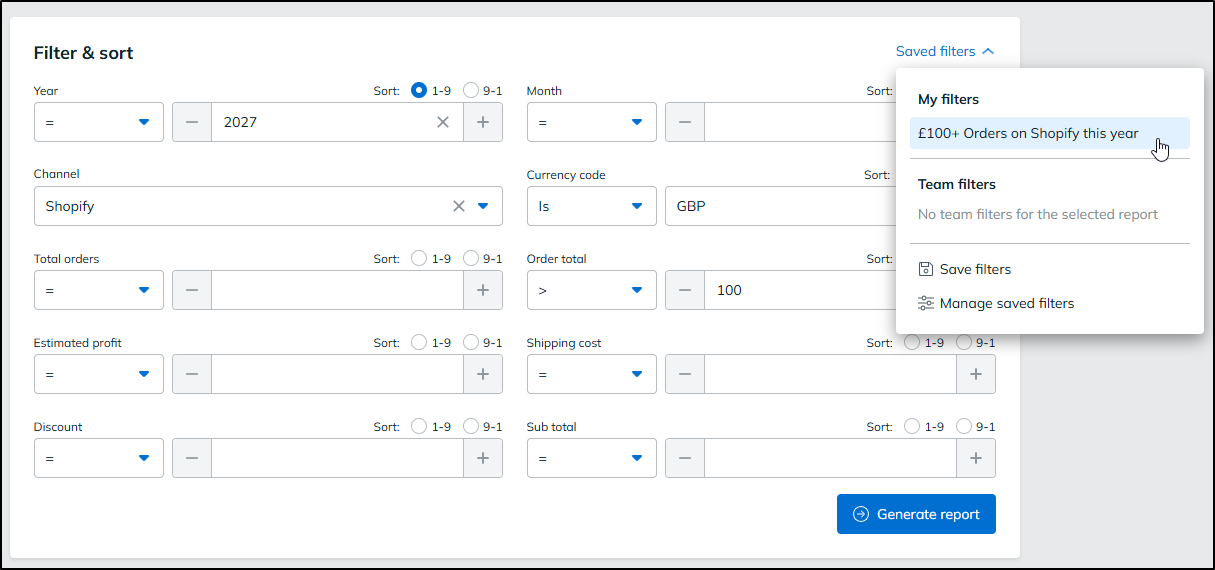
Filters can be kept private for your own use, or made public so your whole team works from the same view. A shared "Last 7 days - UK orders only" filter, for example, means everyone is looking at the same numbers.
We've also added new relative date options to make saved filters even more useful. Pick a simple preset, or build a custom range like "The previous 3 weeks", with a live preview so you know exactly which dates you're getting. Because these dates are relative to when the report runs, your saved filters stay current without any editing.
Scheduled Reports: let the data come to you
Turn any report into a schedule and StoreFeeder will run it for you automatically, whether that's daily, on weekdays only, on selected days, or monthly, at the time you choose.
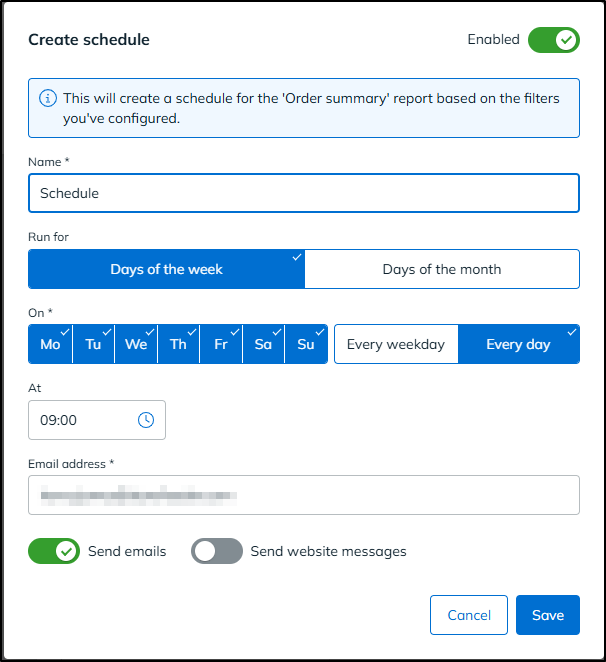
Results land by email as a CSV attachment (or a secure download link for larger reports), and you can switch on in-app notifications too for a quick confirmation that everything ran. Reports can be sent to anyone, including colleagues, accountants or suppliers who don't have a StoreFeeder login.
A few highlights:
- Preview before you schedule to check the first 20 rows and make sure your filters are right.
- Pause and resume any schedule with a single toggle, without losing your setup.
- Export now to grab a one-off copy whenever you need it, without affecting the schedule.
- Run history shows every execution, how many rows were returned, and a link to the file.
- See everything in one place via the new Scheduled reports and Export history pages in Insights.
Schedules run on StoreFeeder's servers, so they'll fire whether or not you're logged in.
Availability
100 scheduled runs per month are included as standard, with higher limits available on Insights Pro. If you're interested in Insights Pro, please reach out to our support team who will be able to give you all the information you need.
👉 Read the full guide to setting up Saved Filters & Scheduled Reports here.
Breached Password Protection
Keeping your StoreFeeder account secure just got easier. When you sign in, StoreFeeder now checks whether your password has appeared in any publicly known data breaches from across the internet. If it has, we'll let you know and give you the option to change it there and then.
What you'll see
If your password turns up in breach data, you'll be taken to a page headed "Your password is not unique" after signing in, rather than straight to your dashboard.
.png)
This doesn't mean StoreFeeder has been breached, and it doesn't mean your account or customer data has been accessed. It simply means the password itself has appeared somewhere in a list of leaked passwords, often because someone else, somewhere on the internet, used the same one on a site that was later compromised. Attackers use these lists when trying to break into accounts, so any password on them is considered weak, even if you've never shared it with anyone.
The check is carried out securely, and your password is never sent to a third party.
Your options
You'll see two choices on the page:
- Change my password takes you to the Change Password screen. Once you've set a new one, you'll carry on into StoreFeeder without needing to sign in again.
- Skip for now takes you to your dashboard as normal. The reminder will appear each time you sign in until your password is updated.
You'll never be locked out. This is a recommendation, not a restriction.
New passwords are checked against the same breach data, so you won't be able to swap one exposed password for another.
Nothing else changes
Two-factor authentication, "Remember this device for 30 days", password resets, account switching and signing out all work exactly as before. If you use 2FA, you'll enter your code first and see the password message afterwards.
Choosing a stronger password
If you're prompted to update, a few quick tips: go for length over symbols, keep it unique to StoreFeeder, and avoid simply adding a number or "!" to your old password, as variations like that are among the first things attackers try. A password manager makes all of this much easier.
Using a shared team login? Now's a great time to ask your account administrator to set up individual logins for each user.
This applies to all StoreFeeder users, whatever their account or permission level.
👉 Read the full guide to Breached Password Protection
Simpler duty handling for Hermes and FedEx

We've made a few changes to take the hassle out of duty values when shipping internationally.
"Default duty to £0" now available for Hermes
The Default duty to £0 if not specified option on the Edit Shipping Method page, previously only available for Royal Mail, can now be used with Hermes too. When it's switched on, any order without a duty value will be sent to Hermes with £0 as the default, and Hermes will calculate the duty for you.
You'll find the toggle on your Hermes shipping methods wherever the sales channel supports Delivered Duty Paid (DDP).
Choose duty paid or unpaid on FedEx shipping methods
FedEx shipping methods now include a dropdown that lets you set whether the service is duty paid or duty unpaid, so you can match each method to how you ship.
No more duty prompts on duty unpaid shipments
If your Hermes or FedEx shipping method is set to duty unpaid, you'll no longer be asked to enter a duty paid value when despatching an order. Since the recipient pays the duty, you don't need to provide a value, so despatch is now one step quicker.
Finally….
There have been some great new features and fixes implemented in this last month's releases and we hope you find them useful in one way or another.
As always, we’ll keep working hard to provide you with the best service we can.
From all of us here at StoreFeeder, happy selling.
The StoreFeeder Team


