



































Welcome to the latest Release Updates post.
I hope I'm not alone in saying that I'm glad Winters come to a close and we are finally seeing some sunshine. Speaking of seasons, much like the one we are now in, work on StoreFeeder Version 3 is springing ahead with no sign of slowing down! Last month saw the release of the beta page for manifests and this month we've been treated to the beta page for orders; if you didn't catch the article all about it you can catch it here.
As per usual, our developers have been working hard to bring you an exciting update this month. There has been a lot of work in the background (which you can read about here) but there have been some great updates and new features released this past month, the highlights of which are below:
Purchase Order Pallets and Notes

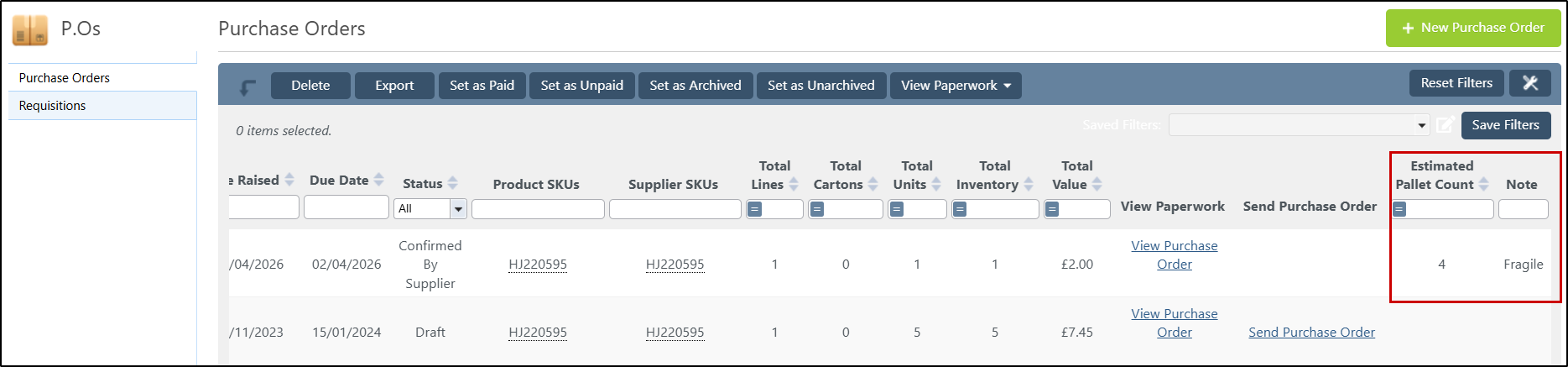
In March we've received a couple of updates to the purchase order page, one of which was the ability to record notes and set an estimated pallet count against each order. Once notes have been added to orders they will be visible from the purchase orders grid so that information relating to it can be obtained with ease as you can see below:
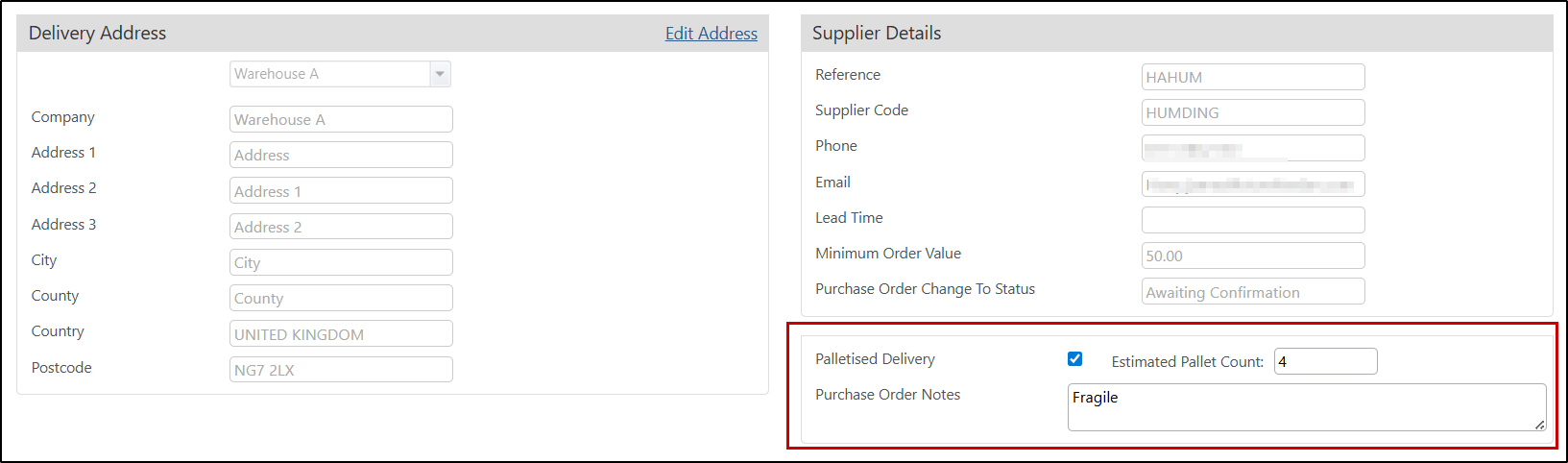
To add notes and pallet counts to your orders, simply edit them by clicking on the purchase order ID and then, write the relevant information in the fields pictured here:
Purchase Order Saved Filters
If you've been a long time StoreFeeder subscriber then you'll be quite used to seeing updates that look very similar to this one pop up every now and then! Much like you'll find on our orders, products and import/export pages we've added the saved filters feature to our purchase order page as well.
If you've never used our saved filters tool before then I'd highly recommend it! I guarantee you'll find it saves you time on a daily basis if you find you're constantly having to set filters on each grid to get the data you need. Here's a great guide on using the feature.
Force Password Change
For the best security practice, you should make sure your users each have long complex passwords with nothing easily guessable within them and that they aren't shared across multiple sites; on top of that you can make use of our multi-factor authentication (MFA) security feature and have each of your users have an extra layer of security to their accounts.
But with this all being said, it's still a good idea to change your password now and then, especially if you aren't taking advantage of MFA. Up until now, there's been visibility of when your users last changed their passwords but never a way to enforce a password change if it had been too long (other than having a stern word with them of course!).
It seemed logical for us to add such a way for our clients to enforce password changes on their users. So now if you edit any of your users, you'll see a button in the top right forcing a password change on the users next login attempt as you can see below:

Finally….
There have been some great new features and fixes implemented in this last month's releases and we hope you find them useful in one way or another.
As always we’ll keep working hard to provide you with the best service we can.
From all of us here at StoreFeeder, happy selling.
The StoreFeeder Team


